Photo culling, one photo at a time.
3,000 photos from Saturday’s shoot, and a grid view won’t get you through them. Keep or Toss shows one photo at a time, so the pile actually goes down.
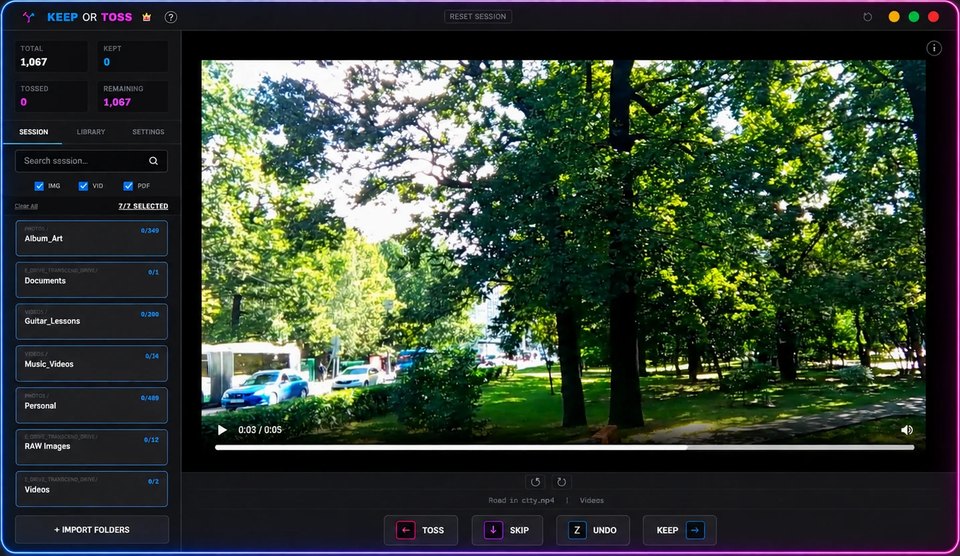
No account needed. Your files stay on your computer. Keep or Toss runs on Windows and Mac.
Finishing the shoot isn’t the same as finishing the job.
A shoot isn’t finished until the pile becomes a short list someone can use. Until then the card stays full, the best shots stay buried among near-duplicates, and the job keeps hanging over you.
A simple manual culling workflow.
You make every call yourself, one photo at a time.
First pass, fast.
Gut calls only — keep or toss. Don’t open an editor and don’t zoom in yet.
Closed eyes, bad framing, an exact duplicate: toss without a second look.
Skip the maybes.
Not sure in two seconds? Skip it and keep moving — it comes back around.
Two near-identical frames of the same moment are a textbook skip: leave them for the second pass.
Second pass on the skips.
With the easy calls already made, the maybes get easier to judge.
Zoom in to check focus on the ones that are genuinely close calls.
Send your selects as you go.
A dedicated key for Selects files it the moment you decide — no separate sorting pass after.
By the end of the pass, Selects is already a folder someone else can open.
A few things worth checking before you decide.
Is it in focus? A soft shot rarely gets better with a second look.
In a portrait or a group, are the eyes open and does the expression land? Usually one frame in a run has it.
From a run of near-identical shots, pick the strongest frame and let the rest go. That is the job for your second pass — a second photo telling the same story rarely adds anything.
What’s it for? A client delivery gets judged differently than a family album.
Your picks go straight to where they’re headed.
Set up to seven folders of your own — any folder, any key or click, you choose both. Point one at Selects, another at Edit, a third at Print or a client folder, whatever matches how you work; press its key and the file moves there the moment you decide, available on every tier. It’s separate from keep and toss, not a replacement: a place to send the shots that need to go somewhere specific while the rest of the pass keeps moving.

Shoot in RAW, JPG, or both — they’re all here.
RAW formats (ARW, CR2, CR3, NEF, DNG, RAF, ORF) are included on the Pro tier. Images are one of three categories — Essential unlocks one, Plus two, Pro all three. Shoot RAW and hand off a JPG batch from a second camera, and they sit in the same queue — no separate pass for each format. Zoom in to check focus or expression before deciding.

A tossed photo moves to a folder named .KeepOrToss_deleted inside the same folder — nothing leaves your computer, and nothing is gone until you empty it yourself. Changed your mind on a call mid-pass? Undo brings it straight back.
Most shoots aren’t just photos — video clips and PDFs (shot lists, releases, contracts) can go through the same queue, with the categories your license includes. Folders from several cards and drives become one continuous queue, and progress saves as you go, so a cull that spans more than one sitting never loses its place.
Finish the cull tonight, not next weekend.
One-time purchase from $4.99. RAW support is on the Pro tier ($19.99). No subscription.


Frequently asked
What RAW formats are supported?
ARW, CR2, CR3, NEF, DNG, RAF and ORF RAW files are included on the Pro tier. Images (JPG, PNG, HEIC/HEIF, WEBP, GIF) are one of three categories: Essential unlocks one, Plus two, Pro all three.
Does it delete my photos?
No. A tossed photo moves to a folder named .KeepOrToss_deleted inside the folder you’re culling. It stays there until you empty it yourself.
Can I send my picks to a folder?
Yes. Set up to seven destination folders of your own choosing, each with a key you assign, and send a photo there with one keystroke or one click while you work.
Do I need an account or a subscription?
No account, and no subscription — it’s a one-time purchase.
Does it work with photos on an external drive or SD card?
Yes. Processing is local, and folders from internal drives, external drives, or SD cards can go in the same queue.
Which operating system does it run on?
Windows, and macOS 11 or later on Apple Silicon Macs. Intel Macs are not supported.